
Large data warehouses can produce vast volumes of redo, especially during batch loads or transformation cycles. In many cases, the daily archive log generation alone exceeds what can reasonably be staged, transferred, or retained in a recovery area for the duration of a migration. This makes redo-dependent strategies operationally complex, if not outright impractical.
At the same time, performance-driven design choices further complicate matters. Many warehouse workloads rely heavily on NOLOGGING operations—such as direct-path inserts, CTAS (Create Table As Select), and index rebuilds—to maximise throughput. While effective for performance, these operations get created in a way to bypass redo generation, meaning replication technologies like Oracle Golden Gate or Data Guard cannot guarantee a complete and consistent copy of the data. As a result, organisations are often left without a reliable “online sync” option.
This is where Transportable (TTS), combined with RMAN incremental backups, becomes a highly effective migration strategy.
Why TTS for Large-Scale Migrations?
TTS operates at the tablespace level, allowing large volumes of data to be moved quickly and efficiently without relying on row-by-row data transfer. This makes it significantly faster than logical methods such as Data Pump for multi-terabyte systems.
Crucially, TTS is a mature and well-supported approach that works across platforms and database versions. It is fully compatible with legacy environments such as Oracle Database 11g Release 2 and supports cross-platform migration through RMAN conversion. For organisations modernising long-lived data warehouse estates, this compatibility is a major advantage.
The Key Concept: Baseline + Incremental Backups
The real power of TTS comes when combined with a staged migration approach using a level 0 (L0) backup followed by incremental roll-forwards. This method shifts the majority of data movement outside the outage window, dramatically reducing downtime.
A typical process looks like this:
1. Assessment and Preparation
Identify candidate tablespaces (typically large fact and dimension tables). Ensure they are self-contained and validate TTS prerequisites. Plan separately for non-transportable objects such as users, roles, and database links. In our example we will be migrating a database as old as 11.2.0.4
[oracle@a11gr2oel7tts ~]$ sqlplus / as sysdba
SQL*Plus: Release 11.2.0.4.0 Production on Wed Jun 3 14:53:35 2026
Copyright (c) 1982, 2013, Oracle. All rights reserved.
Connected to:
Oracle Database 11g Enterprise Edition Release 11.2.0.4.0 - 64bit Production
With the Partitioning, Automatic Storage Management, OLAP, Data Mining
and Real Application Testing options

SQL> select tablespace_name, bigfile, status, encrypted from dba_tablespaces;

TABLESPACE_NAME     BIG STATUS     ENC
-------------------- --- --------- ---
SYSTEM               NO  ONLINE    NO
SYSAUX               NO  ONLINE    NO
UNDOTBS1             NO  ONLINE    NO
TEMP                 NO  ONLINE    NO
USERS                NO  ONLINE    NO
DEMO2TBSBF           YES ONLINE    NO
DEMO1TBS             NO  ONLINE    NO
DEMO3TBSBF           YES ONLINE    NO

8 rows selected.Tablespaces that we will be migrating are DEMO2TBSBF, DEMO1TBS and DEMO3TBSBF. The TTS script will check the schemas marked for migration against those tablespaces so that no orphan objects get to be migrated before starting the backup process.
In ADB-S all tablespaces use Big File configuration (32TB), if Small File tablespaces exist in the source system then the migration process will move all tablespaces into a Big File configured tablespace, also worth noticing that there is no encryption used in our source database, once everything has been migrated all tablespaces will be fully encrypted in their target database.
2. Dry Run
Migration to ADB-S using TTS supports both object store and FSS as intermediate storage for the migration. TTS does not require any extra configuration (we will demonstrate the differences later in this post) but in order to use object store you do require to download using this link:
https://www.oracle.com/database/technologies/oracle-cloud-backup-downloads.html
You only need to download and copy the oci_install.jar and provide the path with the configuration file <tts-backup-env.txt>, the script will take care for the installation of Oracle’s database cloud backup module.
Create the bucket to place your backup and Metadata and make sure you use the right URLs in the configuration file. It should read like:
https://<namespace>.objectstorage.<region>.oci.customer-oci.com/n/<namespace>/b/<bucket-name>
where namespace is your tenancy name.
Copy the compartment OCID of where the buckets have been created.
[oracle@a11gr2oel7tts ttsfos]$ cat tts-backup-env.txt
[DEFAULT]
### Project and Tablespace inputs
PROJECT_NAME=TESTF11g
DATABASE_NAME=myorcl
TABLESPACES-DEMO1TBS,DEMO2TBSBF, DEMO3TBSBF
SCHEMAS-DEMO12SOE, DEMO25SOE, DEMO8SOE, DEMO14SOE, DEMO22SOE, DEMO26SOE, DEMO1SOE,DEMO10SOE,DEMO17SOE, DEMO19SOE, DEMO24SOE, DEMOSE,DEMO11SOE, DEMO20SOE, DEMO23SOE, DEMO4SOE, DEMO13SOE, DEMO16SOE, DEMO27SOE, DEMO3SOE,
DEMOSSOE, DEMO9SOE, DEMO15SOE, DEMO21SOE, DEMO28SOE, DEMO2SOE, DEMO6SOE, DEMO18SOE


#### Database connection inputs
HOSTNAME=a11gr2oel7tts.sub02211403571.gr2ttsvcn.oraclevcn.com
LSNR_PORT=1521
DB_SVC_NAME=myorcl.sub02211403571.gr2ttsvcn.oraclevcn.com
ORAHOME=/usr/oracle/app/oracle/product/11.2.0/db_1
DBUSER-sys
DB_VERSION=11g


#### Object Storage Service (OSS) inputs #### OCI Installer inputs
TTS_BACKUP_URL=https://oradb*****ucm.objectstorage.us-ashburn-1.oci.customer-oci.com/n/oradb*****ucm/b/11gR2TTS4-Backup
TTS_BUNDLE_URL=https://oradb*****ucm.objectstorage.us-ashburn-1.oci.customer-oci.com/n/oradb*****ucm/b/11gR2TTS4-Metadata
OCI_INSTALLER_PATH=/home/oracle/ttsfos/opc_installer/opc_installer/oci_installer/oci_install.jar
CONFIG_FILE=/home/oracle/ttsfos/tts-backup.conf
COMPARTMENT_OCID=ocid1.compartment.oc1..aaaaaaaa***********************************************kt5q
OCI_PROXY_HOST=
OCI_PROXY_PORT=


### File Storage Service (FSS) inputs
TTS_FSS_CONFIG=
TTS_FSS_MOUNT_DIR=


### Run type inputs
FINAL_BACKUP-FALSE
DRY_RUN=TRUE


### Performance inputs
PARALLELISM=4
CLUSTER_MODE-FALSE


### Miscellaneous inputs
### Exclude tables input (case-sensitive)
EXCLUDE_TABLES=
EXCLUDE_STATISTICS=
TRANSPORT_TABLES_PROTECTED_BY_REDACTION_POLICIES=
TRANSPORT_TABLES_PROTECTED_BY_OLS_POLICIES=
TRANSPORT_DB_PROTECTED_BY_DATABASE_VAULT=
DVREALM_USER=
[oracle@a11gr2oel7tts ttsfos]$
There are two things more needed before proceeding with a Dry Run, make sure you target ADB-S has access to the bucket and make sure that your complete the necessary configuration details <tts-backup.conf> to allow the backup script to have access to the both the Backup and the Metadata buckets.
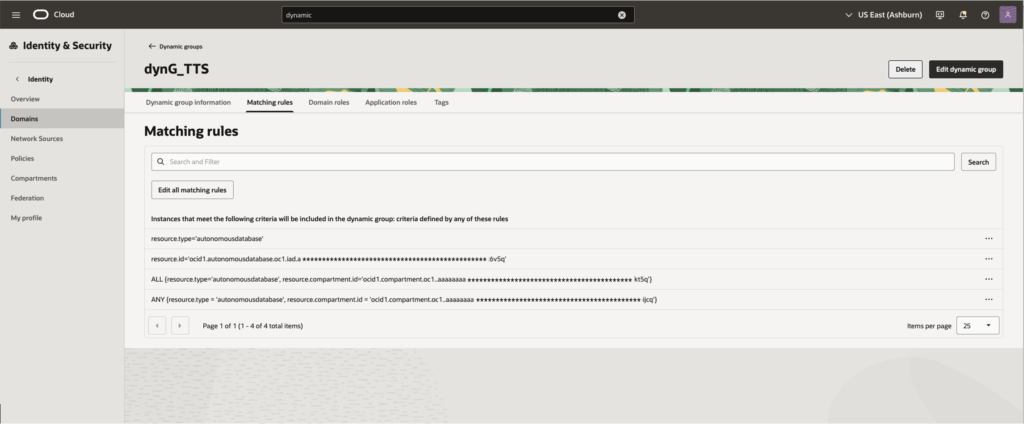
To make bucket available to your autonomous database to be created you need to create a Dynamic Group, go to Identity & Security then Domains, pick your domain and then select Dynamic Groups, create the dynamic group (my group is dynG_TTS – any name would do ) with the following matching rule:
ANY{resource.type=’autonomousdatabase’,resource.compartment.id=’ocid1.compartment.oc1..xx123456789xx’}
This will allow bucket access to the autonomous database that you will create and since your ADB-S does not yet exist it will give access at a compartment level where you ADB-S will be created.
Next you need to add the policy for the given bucket.
Click to Policies and add a policy that allows access to your Dynamic Group to the buckets and objects to the compartment where your buckets got created
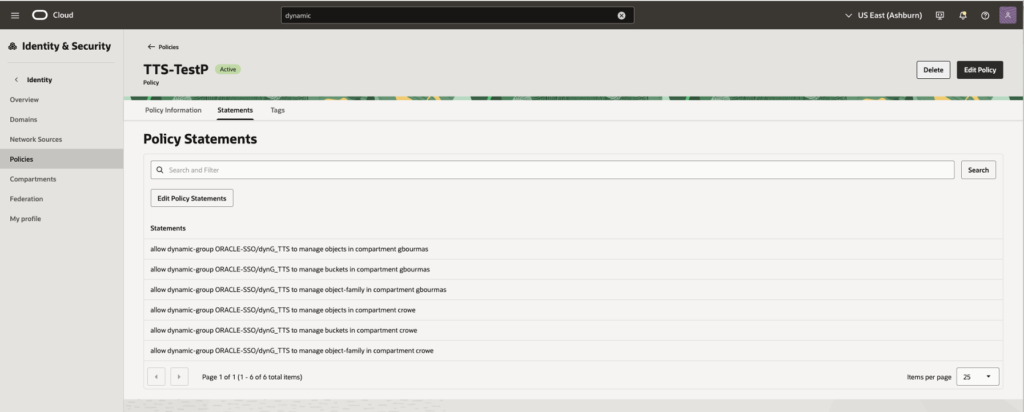
This is the bit where you allow access to the buckets for your backup utility.
You will need user OCID, tenancy OCID and you will need to create a key for providing access.
Once logged in click on your profile icon top left corner
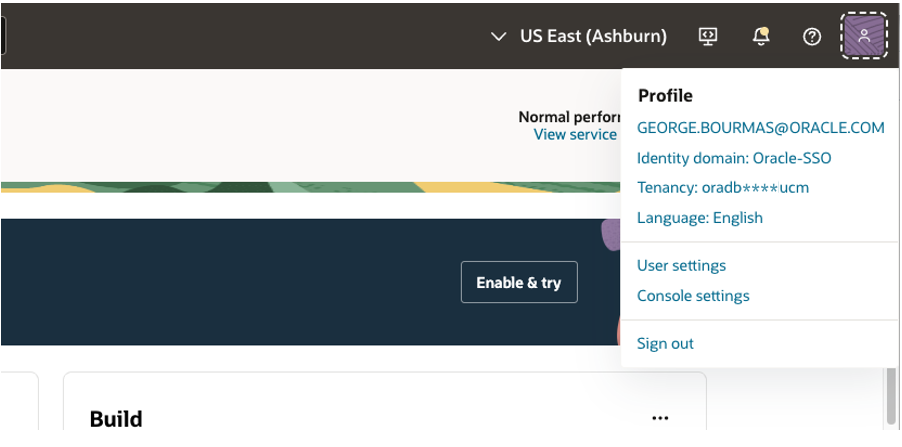
and click on your tenancy name.
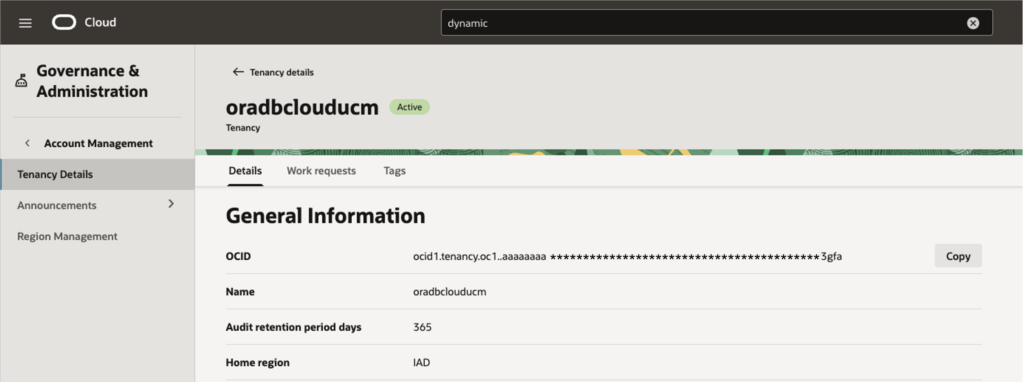
Use the copy button to copy your tenancy’s OCID.
Next click on the profile name and use the Copy button to copy your user OCID.
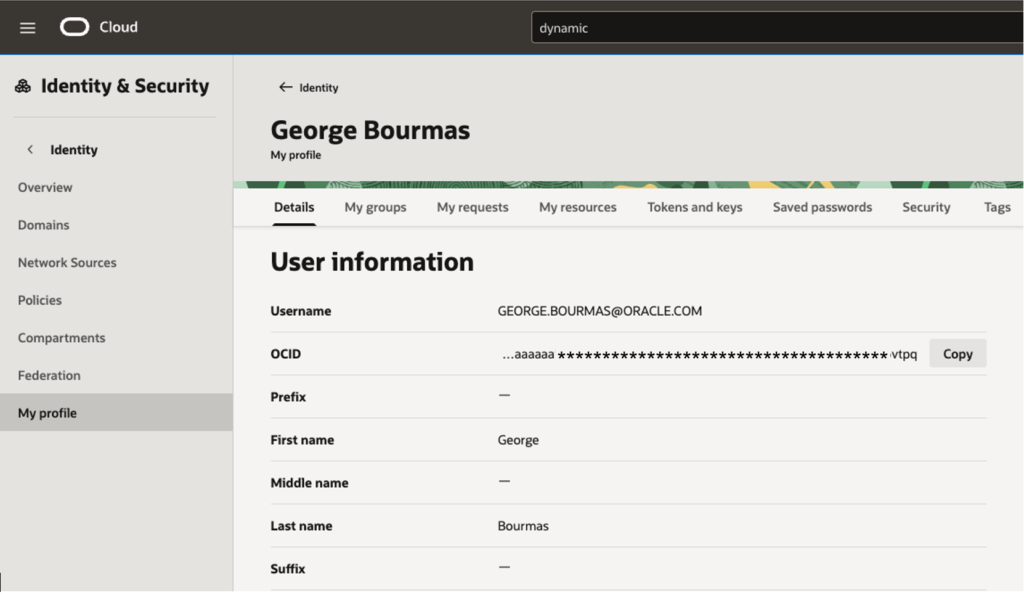
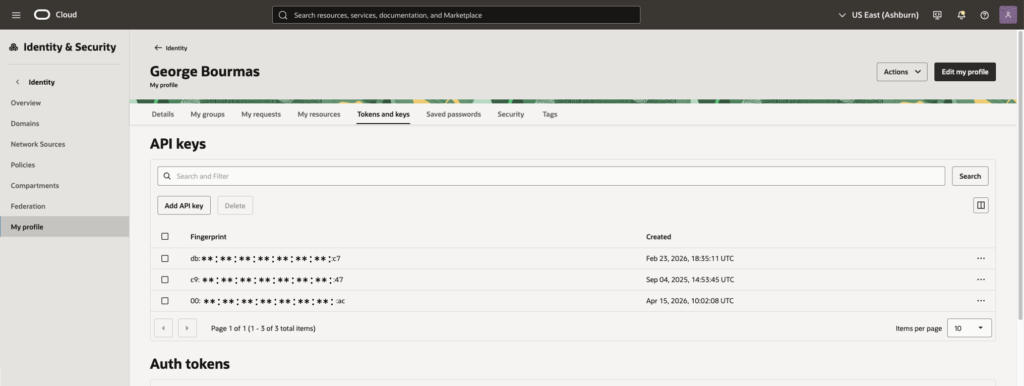
From here click on Token and keys to create an API key.
Click to add an API key
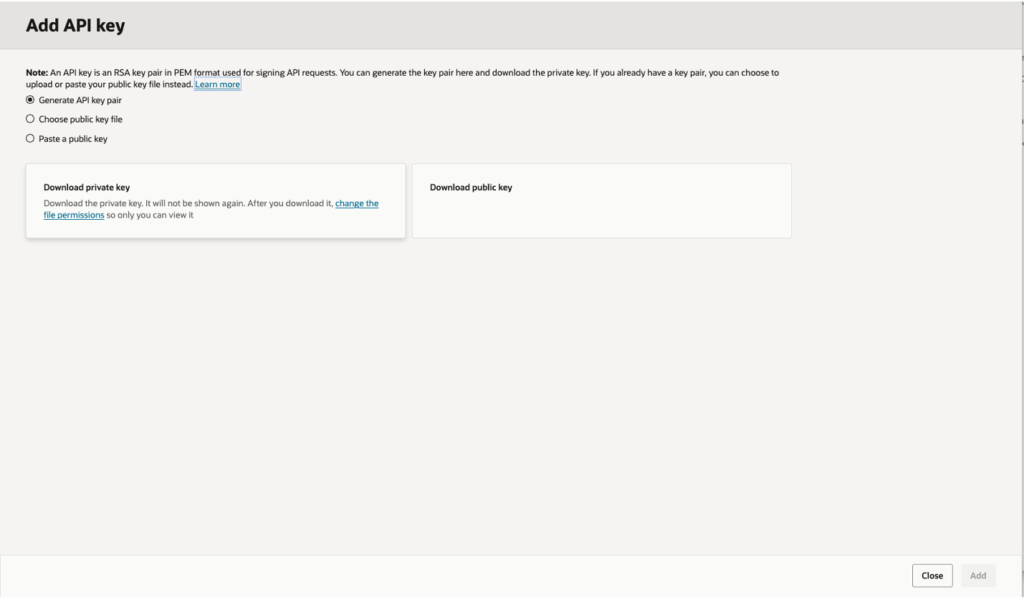
Download the generated keys before clicking the add button.
Click to view the contents of your configuration using the three dots of the newly created key from the API keys screen.
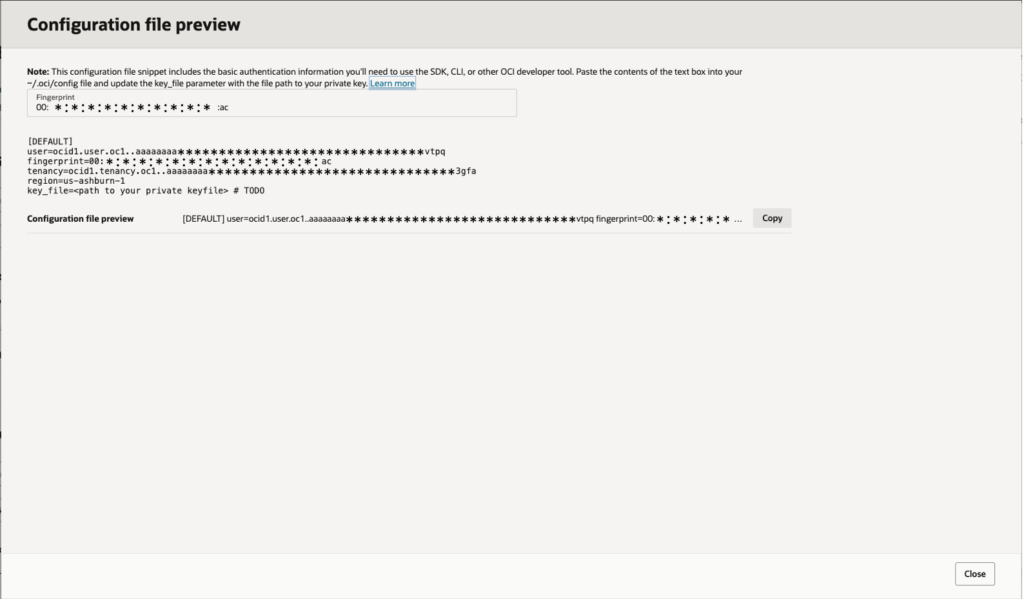
This should also reflect the contents of your <tts-backup.conf> file
[oracle@a11gr2oel7tts ttsfos]$ cat tts-backup.conf
[DEFAULT]
user=ocid1.user.oc1. aaaaaaaa***********************************************6vtpq
fingerprint-00:**:**:**:**:**:**:**:**:**:**:**:**:**:cb:ac
tenancy-ocid1. tenancy.oc1. aaaaaaaa***********************************************v3gfa
region-us-ashburn-1
key_file=/home/oracle/ttsfos/GEORGE.BOURMAS@ORACLE.COM-2026-04-15T10_01_56.692Z.pem
[oracle@a11gr2oel7tts ttsfos]$Make sure that tts_bacnkup_env.txt parameter DRY_RUN is set to TRUE, this will allow you to test your configuration before taking your L0 backup.
The **** part of the below command is where you need to input the password of user sys of your source database.
A successful Dry Run log should look like this
[oracle@a11gr2oel7tts ttsf]$ nohup bash -c 'python3.6 -u tts-backup.py <<< "**********"' > tts-backup-L0-DryRun.log 2>&1 &
[1] 15372
[[oracle@a11gr2oel7tts ttsf]$ tail -f tts-backup-L0-DryRun.log

Moved existing failed directory '/home/oracle/ttsf/TESTF11g/TESTF11g_LEVEL_0_DRY_RUN' to '/home/oracle/ttsf/TESTF11g/TESTF11g_LEVEL_0_DRY_RUN_FAILED_6'
Created project directory with backup level 0: /home/oracle/ttsf/TESTF11g/TESTF11g_LEVEL_0_DRY_RUN.

* Run tablespace validations...

Start Time (UTC): 2026-04-22 15:58:48.758797
Validating schemas...
Fetching common users...
Fetching required users...
Validating tablespaces...
Finding plsql objects that are not transported due to owner not in transport list
Object validations complete.

Validate if tablespace DEMO1TBS is ready for transport...
Validate if tablespace DEMO2TBSBF is ready for transport...
Validate if tablespace DEMO3TBSBF is ready for transport..
Complete Time (UTC): 2026-04-22 15:59:05.078937
Elapsed Time: 0:00:16.320140

* Gather database, pdb and tablespace properties...

Start Time (UTC): 2026-04-22 15:59:05.079217
Executing SQL script to gather data into log file: /home/oracle/ttsf/TESTF11g/TESTF11g_LEVEL_0_DRY_RUN/TESTF11g_data.log...
Data gathering completed successfully.
Complete Time (UTC): 2026-04-22 15:59:05.631678
Elapsed Time: 0:00:00.552461

* Create directory object...

Start Time (UTC): 2026-04-22 15:59:05.632009
Directory TTS_DUMP_DIR created successfully.
Complete Time (UTC): 2026-04-22 15:59:05.699420
Elapsed Time: 0:00:00.067411

TTS BACKUP TOOL: Dry Run Completed Successfully...3. Create the Baseline (L0 Backup)
Once your Dry Run has completed successfully next step would be to run your L0 backup, change DRY_RUN to FALSE and run the script to execute L0 backup
### Run type inputs
FINAL_BACKUP-FALSE
DRY_RUN=FALSEThe **** part of the below command is where you need to input the password of user sys of your source database.
[oracle@a11gr2oel7tts ttsf]$ nohup bash -c 'python3.6 -u tts-backup.py <<< "**********"' > tts-backup-L0.log 2>&1 &
[1] 17684
When L0 backup completes you should see something like the following make note of the value for ADB$TTS_BUNDLE_URL < https://oradb*****ucm.objectstorage.us-ashburn-1.oci.customer-oci.com/n/oradb*****ucm/b/11gR2TTS4-Metadata/o/TESTF11g_LEVEL_0.tgz>
Also make sure that your target database has enough space for this migration, a recommendation can be found towards the end of the file. In case you’re wondering why there is a need to reserve more space than the source database, as explained above tablespaces once copied as datafiles they will be then moved one by one (in the form of utilising shrink) and then if not already encrypted they will be encrypted, that means that extra space is required for the movement of the objects.
[oracle@a11gr2oel7tts ttsfos]$ tail -f tts-backup-L0.log
^C
[1]+. Done                      nohup bash -c 'python3.6 -u tts-backup-py --JDK8_PATH=$JAVA_HOME <<<"**********"' > tts-backup-L0.log 2>&1
[oracle@a11gr2oel7tts ttsfos]$ tail -f tts-backup-L0.Log
Start Time (UTC): 2026-04-15 15:17:43.287564
Bundle uploaded successfully to https://oradb*****ucm.objectstorage.us-ashburn-1.oci.customer-oci.com/n/oradb*****ucm/b/11gR2TTS4-Metadata/o/TESTF11g_LEVEL_0.tgz.
---------
Create a database in ADB-S cloud with minimum storage size of 2283.0GB
Specify tag name/value as
ADB$TTS_BUNDLE_URL: https://oradb*****ucm.objectstorage.us-ashburn-1.oci.customer-oci.com/n/oradb*****ucm/b/11gR2TTS4-Metadata/o/TESTF11g_LEVEL_0.tgz
---------
Complete Time (UTC): 2026-04-15 15:17:43.381656
Elapsed Time: 0:00:00.094092It is also worth noticing that a folder with the name of your project <TESTF11g> can be found on the root directory of where you run the script, including all the process logs from the various invocations of script.
4. Create your target autonomous database and restore your L0 backup
The next will create an autonomous database and will restore your L0 backup, we will do a step by step to check on what is needed to do that.
First, create an Autonomous AI Database. The database must be created in the same compartment where the Dynamic Group and IAM policies have been configured to grant access to the Object Storage bucket that contains the previously stored Level 0 (L0) backup.
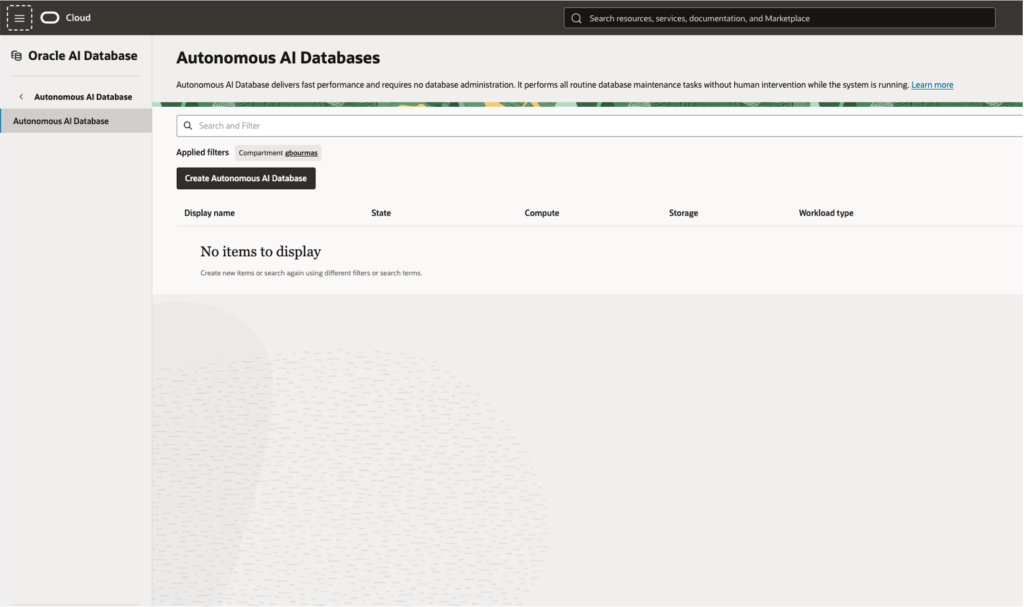
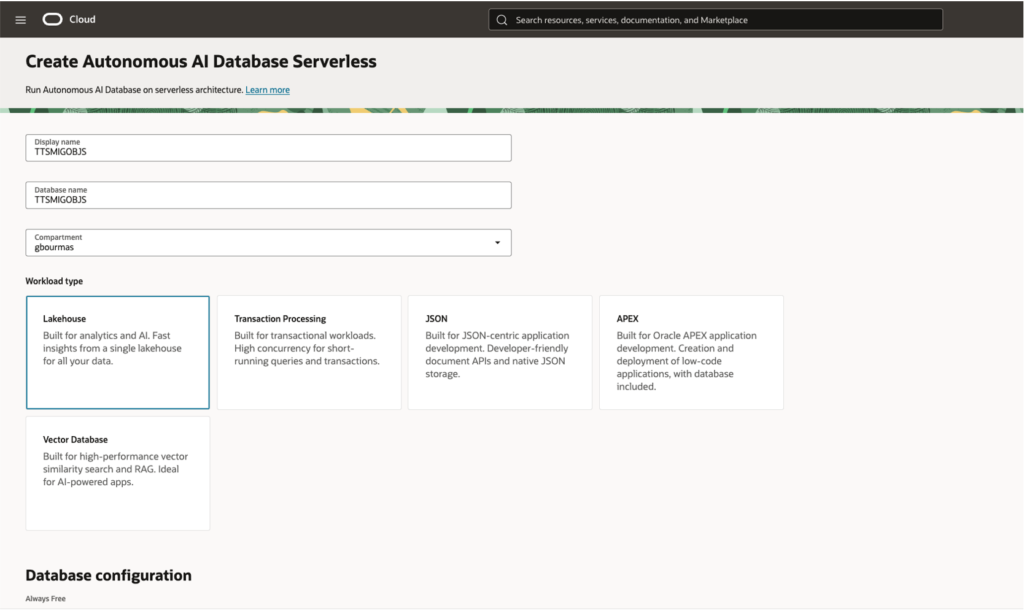
Give your database a name and select the type, in our case we select to have an AI Lakehouse database.
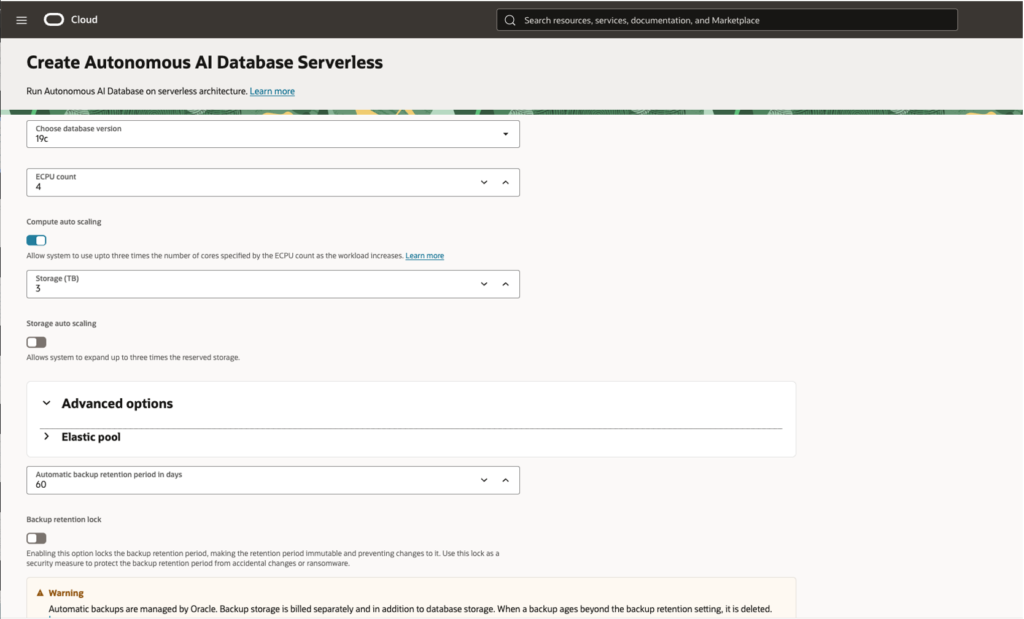
You need to choose a 19c target and add necessary ECPUs and Storage at least as much as recommended by the L0 backup script output.
Create necessary credentials and make sure that the database a Private Endpoint access only.
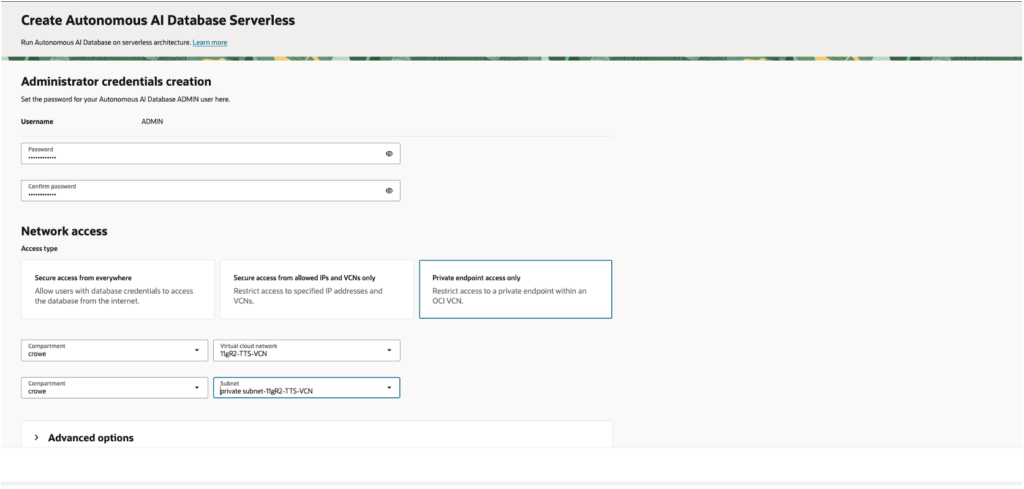
Use a VCN you have already configured and place the database in a private subnet.
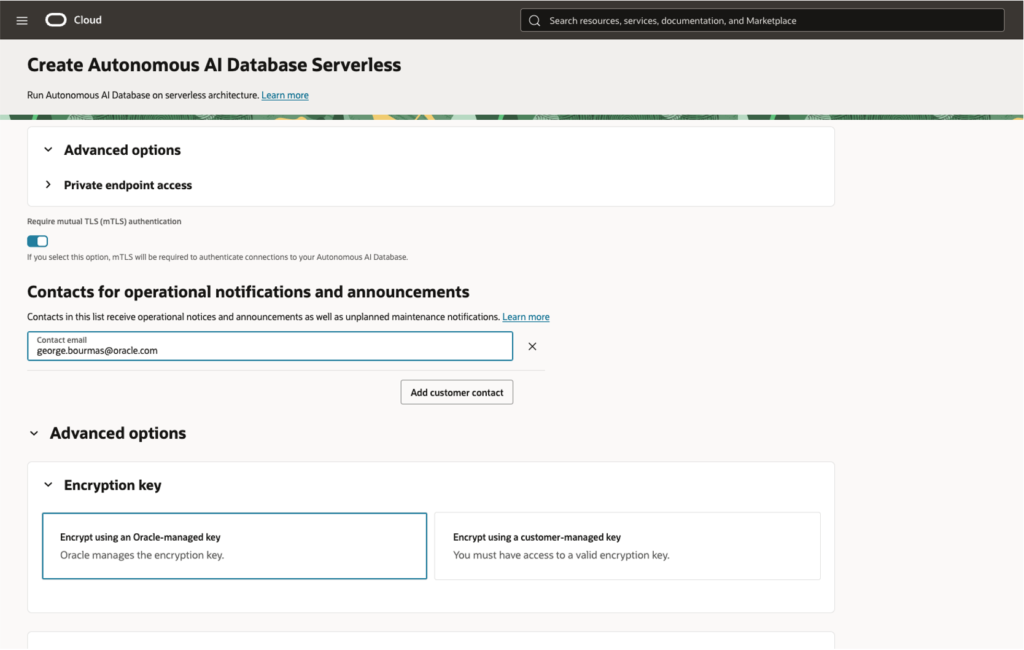
and then click the Migration arrow expand and add the ADB$TTS_BUNDLE_URL value that your L0 backup script created: < https://oradb*****ucm.objectstorage.us-ashburn-1.oci.customer-oci.com/n/oradbc*****ucm/b/11gR2TTS4-Metadata/o/TESTF11g_LEVEL_0.tgz>
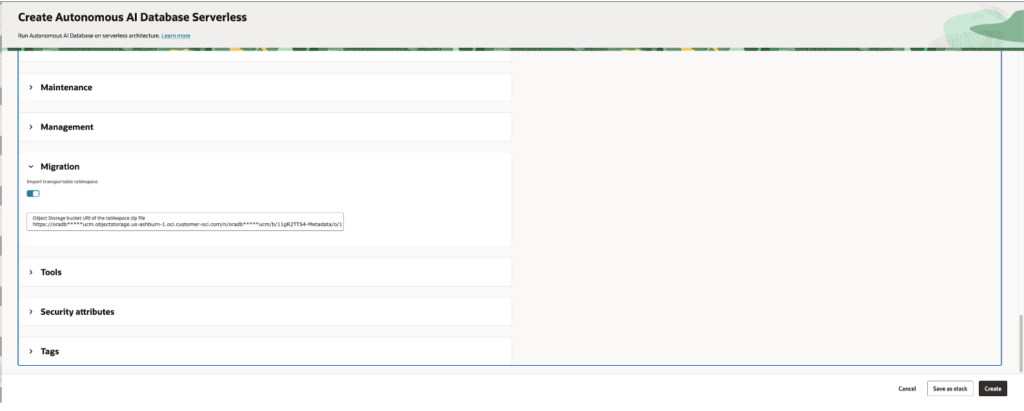
Then click to create your target database, you can check the creation progress by checking the Work requests option
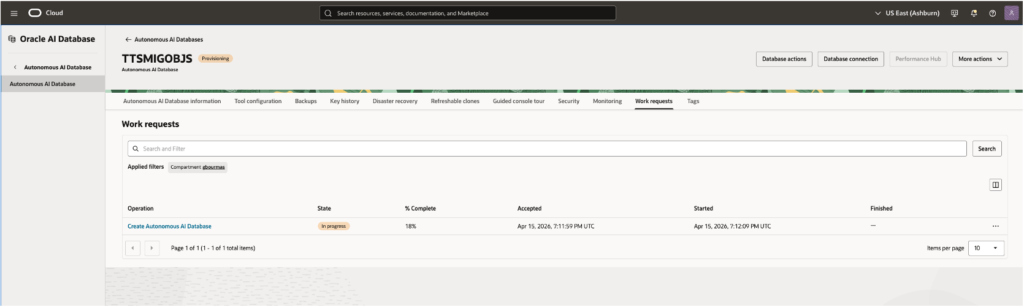
Once the database has been provisioned successfully you can connect to check what has been done. Remember that this is a Private Endpoint access database only so you will most likely need a bastion to access the database. Ways to Connect to Autonomous Database on a Private Network
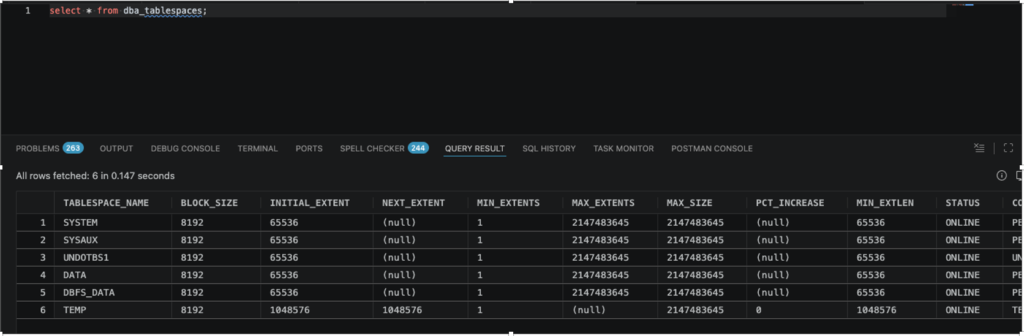
Although the files have been copied, only the ADBS default tablespaces are available
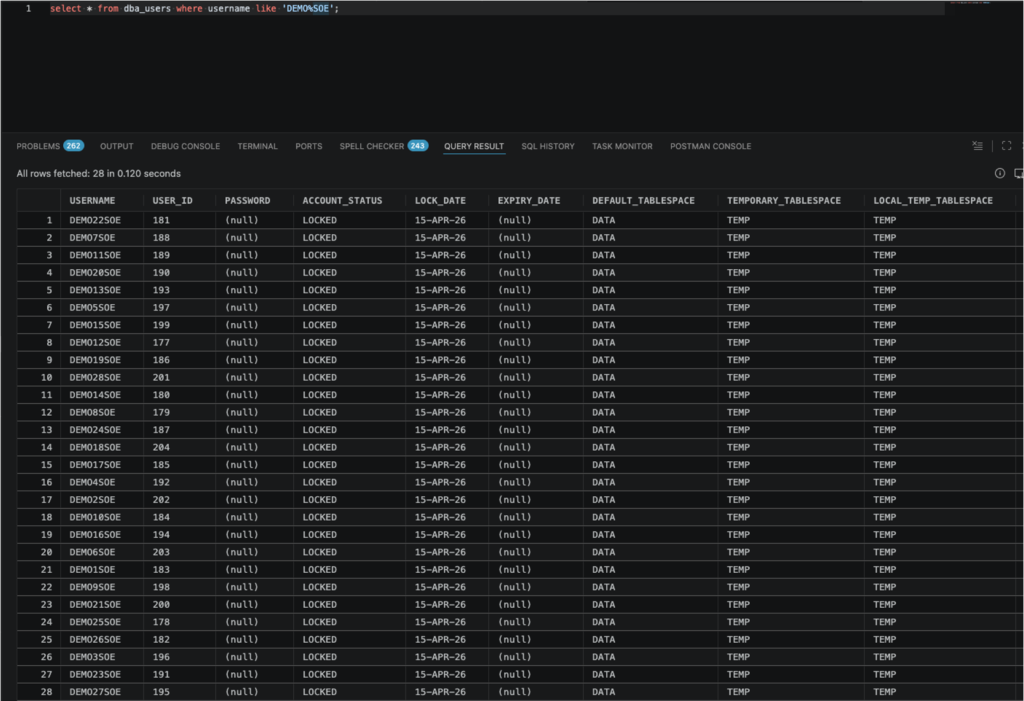
The schema to be migrated on the other hand have been created with the user accounts locked.
4. Incremental Backups While Production Continues
The Iterative Phase (L1 Backups)
The process began by transferring a full Level 0 (L0) backup to the target environment. Because the source database remains open for read/write operations, the data immediately begins to deviate.
To bridge this gap, we perform incremental Level 1 (L1) backups:
- Repetition: This process can be repeated as many times as necessary.
- Goal: Each subsequent L1 backup captures only the changes made since the previous sync. By running these iteratively, we decrease the volume of data remaining for the final step, effectively shortening the required cutover time.
Final Cutover and Metadata Sync
Once the time required to process an L1 backup is low enough to fit within our maintenance window, the final cutover begins:
- Transition to Read-Only: The tablespaces being transported are set to READ ONLY on the source database to ensure data consistency.
- Final Incremental Backup: A final L1 backup is taken to capture the last remaining changes.
- Metadata Export (Data Pump): Simultaneously, a Data Pump Export (expdp) is performed. Since the physical data is already moved via the backups, this export only captures the logical metadata (table definitions, constraints, indexes, etc.) representing the source structures.
- Target Import: On the target database, the final L1 backup is applied, followed by a Data Pump Import (impdp) of the metadata. This plugs the physical datafiles into the new database and recreates the logical structures.
To maximise the benefits of this methods it is highly advised to enable Block Change Tracking (BCT). Without BCT, RMAN must scan every data block in the tablespace to identify which ones have changed since the last backup, a process that becomes increasingly resource-intensive as database size grows. With BCT enabled, the database maintains a small binary file that tracks exactly which blocks have been modified. This allows RMAN to skip the full file scan and go directly to the changed blocks, drastically reducing the time and CPU overhead required for each L1 incremental backup. In the context of our TTS approach, BCT is the key to achieving the shortest possible “final delta” and ensuring the cutover window remains predictable.
Since we are only demonstrating the use of Transportable Tablespaces as a data migration method we will skip intermediate incremental backup and restores and move straight to performing the last incremental backup and proceed to performing the final restore.
Performing intermediate incremental steps is a straightforward process which is identical to the final one with only difference that the target database will not be available for use until the final restore.
5. Final Backup and Restore, a Cutover with Minimal Downtime
During the cutover window, set the tablespaces to READ ONLY to take the final incremental backup.
[oracle@a11gr2oel7tts ~]$ sqlplus / as sysdba
SQL*Plus: Release 11.2.0.4.0 Production on Wed Jun 3 14:53:35 2026
Copyright (c) 1982, 2013, Oracle. All rights reserved.
Connected to:
Oracle Database 11g Enterprise Edition Release 11.2.0.4.0 - 64bit Production
With the Partitioning, Automatic Storage Management, OLAP, Data Mining
and Real Application Testing options

SQL> select TABLESPACE_NAME, BIGFILE, STATUS from dba_tablespaces;

TABLESPACE_NAME     BIG STATUS
-------------------- --- ---------
SYSTEM               NO  ONLINE
SYSAUX               NO  ONLINE
UNDOTBS1             NO  ONLINE
TEMP                 NO  ONLINE
USERS                NO  ONLINE
DEMO2TBSBF           YES ONLINE
DEMO1TBS             NO  ONLINE
DEMO3TBSBF           YES ONLINE

8 rows selected.

SQL> alter system switch logfile;

System altered.

SQL> /

System altered.

SQL> /

System altered.
SQL> alter tablespace DEMO2TBSBF read only;

Tablespace altered.

SQL> alter tablespace DEMO1TBS read only;

Tablespace altered.

SQL> alter tablespace DEMOTBSBF read only;

Tablespace altered.

SQL> select TABLESPACE_NAME, BIGFILE, STATUS from dba_tablespaces where TABLESPACE_NAME in ('DEMO2TBSBF', "DEMO1TBS', "DEMO3TBSBF");

TABLESPACE_NAME     BIG STATUS
-------------------- --- ---------
DEMO1TBS             NO  READ ONLY
DEMO2TBSBF           YES READ ONLY
DEMO3TBSBF           YES READ ONLY

SQL>Change FINAL_BACKUP to TRUE on <tts-bacckup-env.txt>
oracle@a11gr2oel7tts ttsfos]$ cat tts-backup-env.txt
[DEFAULT]
### Project and Tablespace inputs
PROJECT_NAME-TESTF11g
DATABASE_NAME-myorcl
TABLESPACES-DEMO1TBS, DEMO2TBSBF, DEMO3TBSBF
SCHEMAS-DEMO12SOE, DEMO25SOE, DEMO8SOE,DEMO14SOE,DEMO22SOE,DEMO26SOE,DEMO1SOE,DEMO10SOE,DEMO17SOE,DEMO19SOE,DEMO24SOE,DEMO7SOE,DEMO11SOE, DEMO20SOE, DEMO23SOE, DEMO4SOE, DEMO13SOE, DEMO16SOE, DEMO27SOE, DEMO3SOE,
DEMO5SOE, DEMO9SOE, DEMO15SOE, DEMO21SOE, DEMO28SOE, DEMO2SOE, DEMO6SOE, DEMO18SOE


#### Database connection inputs
HOSTNAME=a11gr2oel7tts.sub02211403571.gr2ttsvcn.oraclevcn.com
LSNR_PORT=1521
DB_SVC_NAME-myorcl.sub02211403571.gr2ttsvcn.oraclevcn.com
ORAHOME-/usr/oracle/app/oracle/product/11.2.0/db_1
DBUSER=sys
DB_VERSION=11g


#### Object Storage Service (OSS) inputs #### OCI Installer inputs
TTS_BACKUP_URL=https://oradb*****ucm.objectstorage.us-ashburn-1.oci.customer-oci.com/n/oradb*****ucm/b/11gR2TTS4-Backup
TTS_BUNDLE_URL=https://oradb*****ucm.objectstorage.us-ashburn-1.oci.customer-oci.com/n/oradb*****ucm/b/11gR2TTS4-Metadatal
OCI_INSTALLER_PATH=/home/oracle/ttsfos/opc_installer/opc_installer/oci_installer/oci_install.jar
CONFIG_FILE=/home/oracle/ttsfos/tts-backup.conf
COMPARTMENT_OCID=ocid1.compartment.oc1..aaaaaaaag**************************************rnqc42xdkt5q
OCI_PROXY_HOST=
OCI_PROXY_PORT=


### File Storage Service (FSS) inputs
TTS_ FSS_CONFIG=
TTS_FSS_MOUNT_DIR=


### Run type inputs
FINAL_BACKUP=TRUE
DRY_RUN=FALSE


### Performance inputs
PARALLELISM=4
CLUSTER_MODE-FALSE


### Miscellaneous inputs
### Exclude tables input (case-sensitive)
EXCLUDE_TABLES=
EXCLUDE_STATISTICS=
TRANSPORT_TABLES_PROTECTED_BY_REDACTION_POLICIES=
TRANSPORT_TABLES_PROTECTED_BY_OLS_POLICIES=
TRANSPORT_DB PROTECTED_BY DATABASE_VAULT=
DVREALM_USER=
[oracle@a11gr2oel7tts ttsfos]$and then run the final Level 1 backup. (You can run muliple Level 1 backups until you reach your cutover objectives to keep this short we only run a single Level 1 ).
[oracle@a11gr2oel7tts ttsfos]$ nohup bash -c 'python3.6 -u tts-backup.py --JDK8_PATH=$JAVA_HOME <<< "**********"' > tts-backup-L1-Final.log 2>&1 &
[1] 15487

[oracle@a11gr2oel7tts ttsfos]$ tail -f tts-backup-L1-Final.log
at java.lang.ClassLoader.loadClass(ClassLoader.java:307)
at sun.misc. Launcher$AppClassLoader.loadClass(Launcher.java:268)
at java.lang.ClassLoader.loadClass(ClassLoader.java:252)
at java.lang.ClassLoader.loadClassInternal(ClassLoader.java:320)
Failed to install Oracle Database Cloud Backup Module

Running with provided JDK8_PATH...
Oracle Database Cloud Backup Module Install Tool, build 19.3.0.0.0DBBKPCSBP_2019-10-16
Oracle Database Cloud Backup Module credentials are valid.
Backups would be sent to bucket 11gR2TTS4-Backup.
Oracle Database Cloud Backup Module wallet created in directory /home/oracle/ttsfos/TESTF11g/TESTF11g_LEVEL_1.
Oracle Database Cloud Backup Module initialization file /usr/oracle/app/oracle/product/11.2.0/db_1/dbs/opcmyorcl.ora created.
Downloading Oracle Database Cloud Backup Module Software Library from Oracle Cloud Infrastructure.
Download complete.
OCI Backup Module installed successfully.

Oracle Database Cloud Backup Module installed successfully.
Complete Time (UTC): 2026-04-15 15:31:45.379301
Elapsed Time: 0:00:21.254532

* Gather database, pdb and tablespace properties...

Start Time (UTC): 2026-04-15 15:31:45.379445
Executing SQL script to gather data into log file: /home/oracle/ttsfos/TESTF11g/TESTF11g_LEVEL_1/TESTF11g_data.log...
Data gathering completed successfully.
Complete Time (UTC): 2026-04-15 15:31:45.927791
Elapsed Time: 0:00:00.548346

* Create directory object...

Start Time (UTC): 2026-04-15 15:31:45.927975
Directory TTS_DUMP_DIR created successfully.
Complete Time (UTC): 2026-04-15 15:31:46.009173
Elapsed Time: 0:00:00.081198

* Copy wallet into the host list...upon completion of the script you will be provided with a new ADB$TTS_BUNDLE_URL <https://oradb*****ucm.objectstorage.us-ashburn-1.oci.customer-oci.com/n/oradb*****ucm/b/11gR2TTS4-Metadata/o/TESTF11g_LEVEL_1.tgz> make sure you take a note of that since you will be using it on your target database.
[oracle@a11gr2oel7tts ttsfos]$ tail -f tts-backup-L1-Final.log
Start Time (UTC): 2026-04-15 15:32:35.851238
Bundle uploaded successfully to https://oradbclouducm.objectstorage.us-ashburn-1.oci.customer-oci.com/n/oradbclouducm/b/11gR2TTS4-Metadata/o/TESTF11g_LEVEL_1.tgz.
---------
Create a database in ADB-S cloud with minimum storage size of 2283.0GB
Specify tag name/value as
ADB$TTS_BUNDLE_URL: https://oradbclouducm.objectstorage.us-ashburn-1.oci.customer-oci.com/n/oradbclouducm/b/11gR2TTS4-Metadata/o/TESTF11g_LEVEL_1.tgz
---------
Complete Time
(UTC): 2026-04-15 15:32:36.251541
Elapsed Time: 0:00:00.400303

^C
[1]+  Done         nohup bash -c 'python3.6 -u tts-backup.py --JDK8_PATH-$JAVA_HOME <<< "**********"' > tts-backup-L1-Final.log 2>&1
[oracle@a11gr2oel7tts ttsfos]$ tail -f tts-backup-L1-Final.log
Start Time (UTC): 2026-04-15 15:32:35.851238
Bundle uploaded successfully to https://oradb*****ucm.objectstorage.us-ashburn-1.oci.customer-oci.com/n/oradb*****ucm/b/11gR2TTS4-Metadata/o/TESTF11g_LEVEL_1.tgz.
---------
Create a database in ADB-S cloud with minimum storage size of 2283.0GB
Specify tag name/value as
ADB$TTS_BUNDLE_URL: https://oradb*****ucm.objectstorage.us-ashburn-1.oci.customer-oci.com/n/oradb*****ucm/b/11gR2TTS4-Metadata/o/TESTF11g_LEVEL_1.tgz
---------
Complete Time (UTC): 2026-04-15 15:32:36.251541
Elapsed Time: 0:00:00.400303Now we need to apply the final backup, to do so from more actions, pick the option Migrate Data
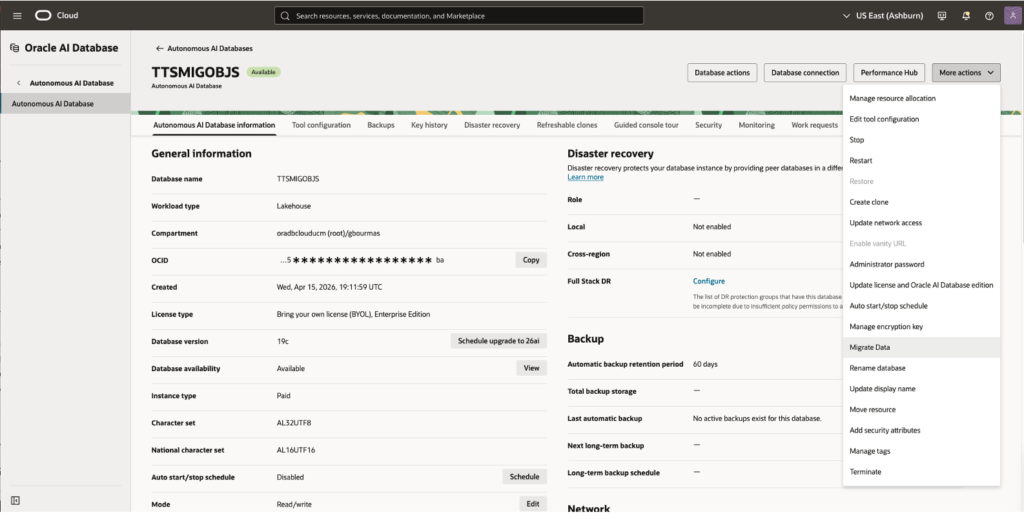
Then click on the switch Import transportable tablespace and paste the new ADB$TTS_BUNDLE_URL < https://oradbc*****ucm.objectstorage.us-ashburn-1.oci.customer-oci.com/n/oradb*****ucm/b/11gR2TTS4-Metadata/o/TESTF11g_LEVEL_1.tgz> and click on Migrate.
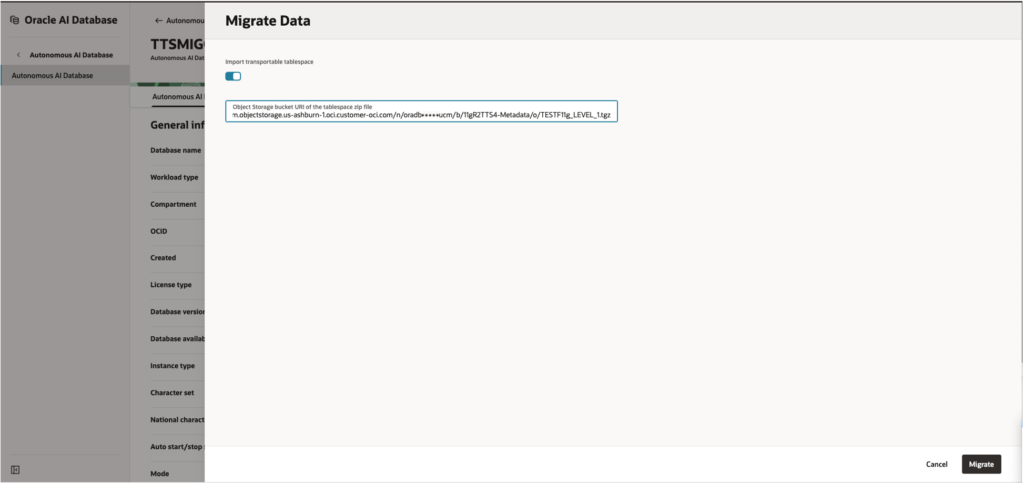
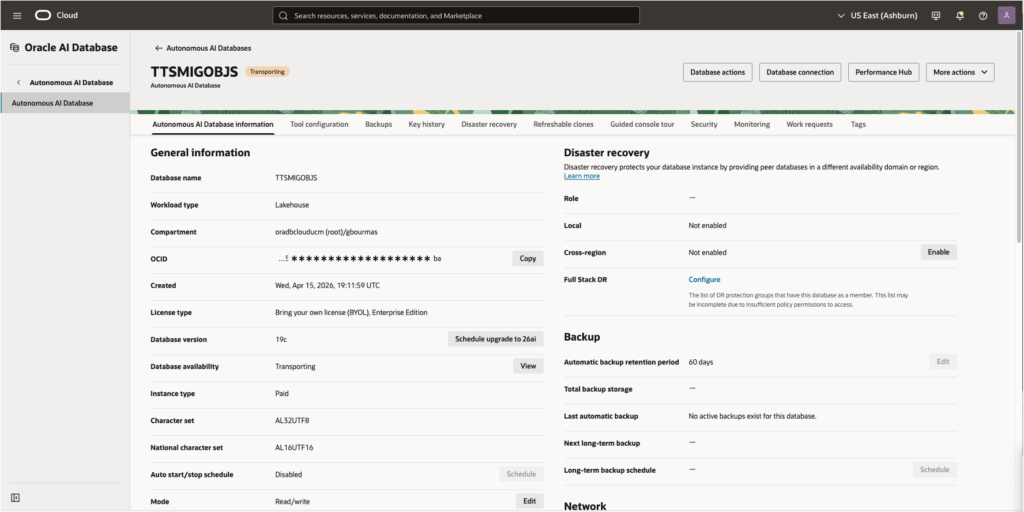
Once you chose to migrate your last piece of backup of your source database, your database will change into Transporting mode
and you can still check the status and progress of the job by checking your Work requests
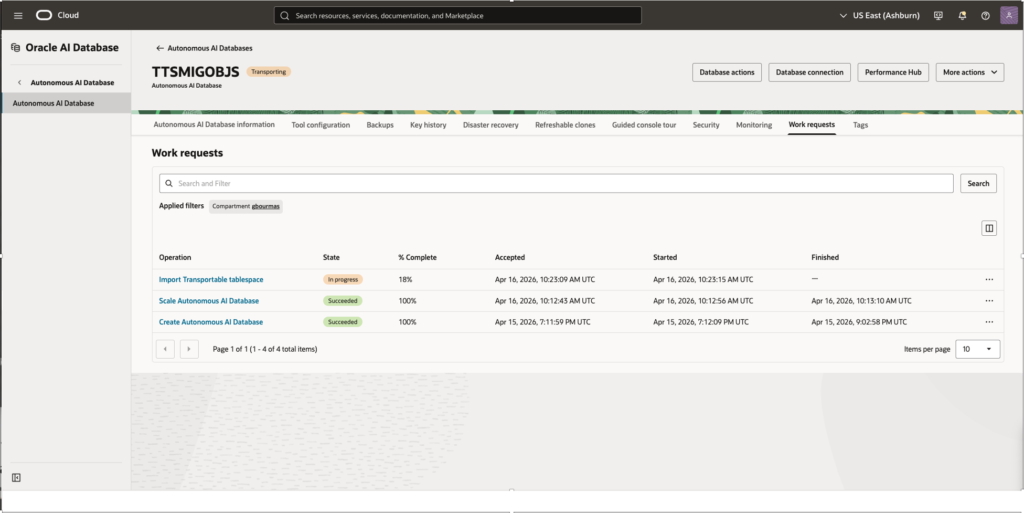
Once the restore and Datapump import completes and even before the Transporting finishes the database is available for use. We can connected to the database to capture what is going on even before the database gets the status Available
<here we will add the intermediate state between Transporting and Available that will be added in a week’s time from now>
At this stage although the background jobs for the finalisation of the database have not yet been completed the database is available to be used. As mentioned above the database will go through a phase where using Shrink which will move each individual database object to a new tablespace which has been created by autonomous, it will do this in order to change existing tablespaces from Small to Big File, to move tablespaces into encrypted status, fully validate the existing objects and leverage other shrink benefits such as:
- Compaction: Oracle rearranges the data rows to fill those empty gaps, packing the data more tightly together
- High-Water Mark (HWM) Reset: Once the data is compacted, the HWM is lowered. This allows the unused space at the “end” of the table or tablespace to be released back to the system.
- Performance Optimization: Because the data is stored more densely, full table scans often become faster since there are fewer blocks for the system to read.
- Cost Management: In an Autonomous environment, reclaiming this space can help you stay within your allocated storage limits, preventing unnecessary scaling costs.
The status of the tablespaces was recorded just as shrink was shifting database objects for the last tablespace created DATA_4.
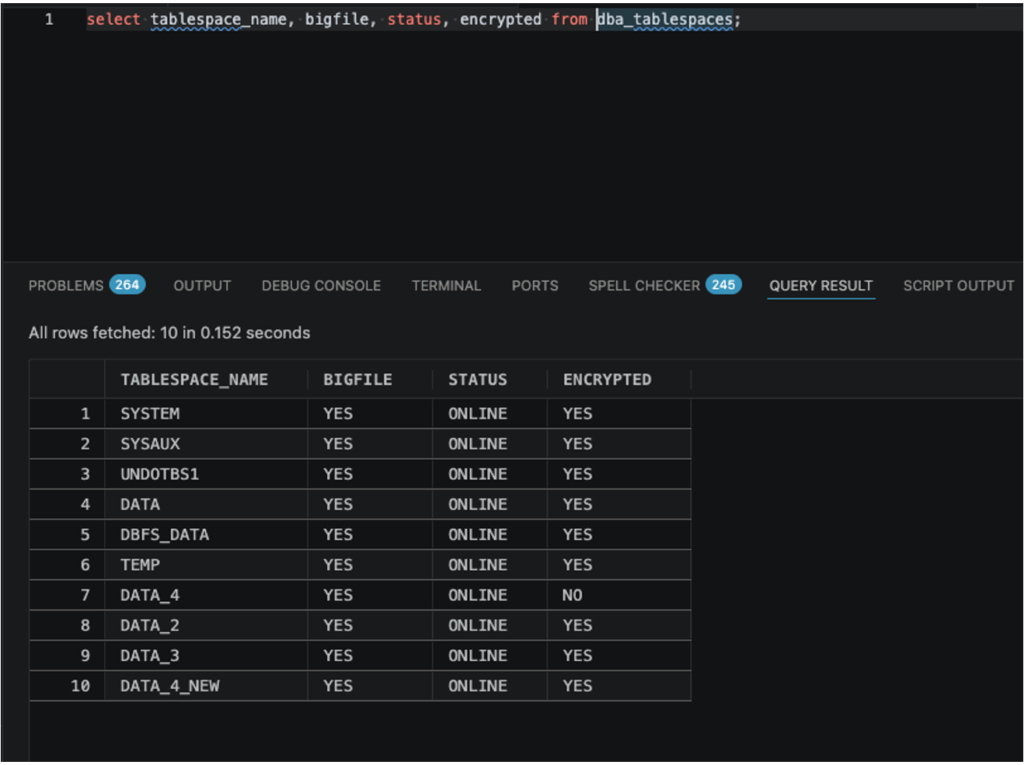
The process runs sequentially for each tablespace migrated and once completed all tablespaces will using Big File and will be fully encrypted (if not already encrypted from the source).
TTS Using File Storage Service
<to be completed>
What Makes This Approach Stand Out
The TTS is an incremental method that directly addresses the limitations of redo-based migrations. It avoids reliance on archive log retention, eliminates risks associated with NOLOGGING operations, and provides a controlled, repeatable migration path.
Most importantly, it reduces downtime to a narrow, predictable window—often just the time required for the final incremental and validation steps. For very large databases, this can mean the difference between an impractical migration and a feasible one.
For organisations dealing with multi-terabyte or petabyte-scale warehouses, this approach is not just an alternative—it is often the only method that balances performance, reliability, and operational simplicity when moving to ADW Serverless.